Heartbeat Monitoring
Heartbeat lets an agent periodically "look around" instead of waiting for a direct instruction. It can inspect mail, code repositories, calendars, system events, or other connectors and decide whether anything needs your attention.
Heartbeat is not a normal scheduled-task action. It is managed by an independent heartbeat scheduler, does not write schedules/*.json, and does not require you to create a recurring scheduled task. You enable, pause, configure, and inspect it from the agent details page.
What Heartbeat Reads
The core configuration lives in the agent repository:
~/.desirecore/agents/<agent_id>/heartbeat/HEARTBEAT.md
This file is the inspection checklist. It should describe:
- which sources or system events to inspect
- how important each source is
- which changes should remain OK
- which changes should produce an Alert
- what summary, details, and suggestions should be included
If an agent does not have HEARTBEAT.md, DesireCore creates an empty template. If the file is empty or only comments, the heartbeat run is skipped instead of calling the model, and that empty check is not counted as a real inspection.
Execution Flow
Each heartbeat run:
- Loads configuration by merging user preferences, agent defaults, and
heartbeat/HEARTBEAT.md. - Checks suppression such as snooze, focus mode, quiet hours, cooldown, or busy state.
- Builds context from the checklist, preferences, and recent system events.
- Runs the query and asks the agent to inspect any source that needs external data.
- Parses the result by detecting
HEARTBEAT_OKor structured JSON / text. - Writes a receipt and decides whether to notify.
If another user query is actively running, background heartbeat skips that run to avoid competing with the live conversation. Manual heartbeat runs skip suppression because you explicitly asked to see the result.
Two Result Types
Heartbeat uses a two-state model:
| Result | Behavior | Description |
|---|---|---|
| OK | Silent record | Everything is normal, or the agent returns HEARTBEAT_OK |
| Alert | Conversation-stream card | Something changed, failed, looks risky, or needs review |
Alert covers both "review this" and "a follow-up action may be needed." If an Alert leads to a real-world operation, the operation still uses the normal approval card. Heartbeat never bypasses confirmation for sending mail, running commands, editing files, or other sensitive actions.
In the conversation stream, OK appears as a green collapsible pill such as "Heartbeat check · Everything normal · Checked N items." Expanding it shows source names, source summaries, and the conclusion.
Alert appears as a heartbeat notification card. It usually includes:
- source name, change count, summary, and details for each checked source
- the agent's conclusion
- suggested next steps
- a Snooze menu, commonly 15 minutes, 1 hour, or 3 hours
The Alert card is only the notification surface. If the next step sends mail, edits files, runs commands, or calls an external service, DesireCore shows the normal approval card for that operation.
Configuring Heartbeat
Open the heartbeat settings from the agent details page.
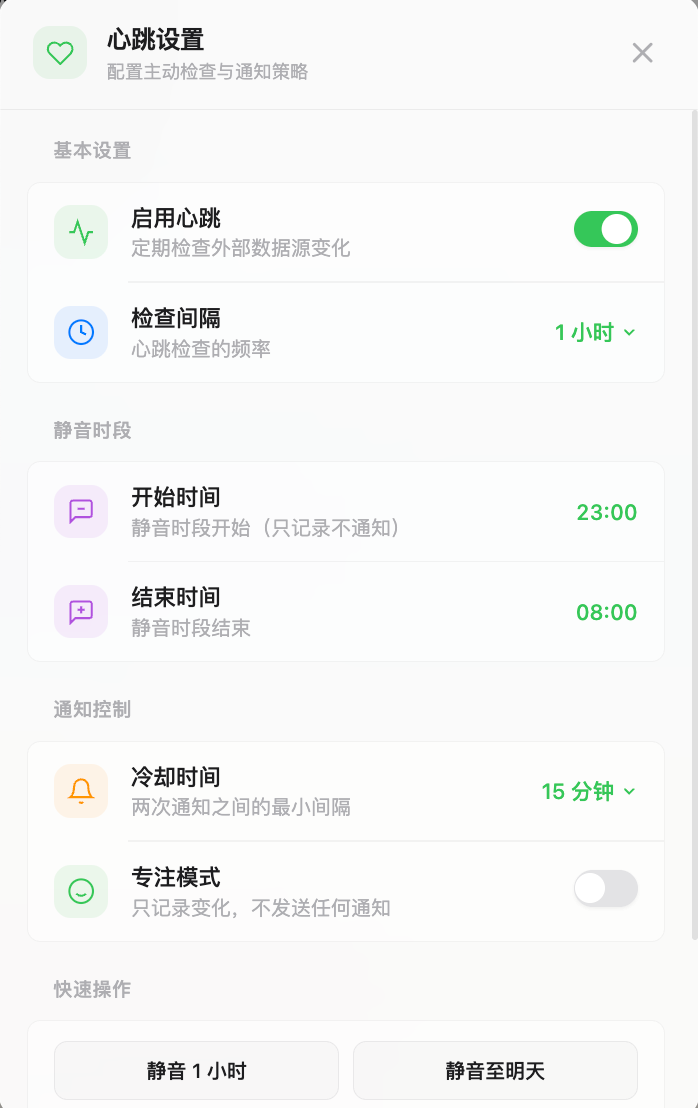
Basic Settings
| Setting | Description |
|---|---|
| Enable heartbeat | Turns heartbeat scheduling on or off for the agent |
| Interval | Common intervals include 15 minutes, 30 minutes, and 1 hour |
| Edit checklist | Opens HEARTBEAT.md in AgentFS so you can define the inspection work |
Preferences are merged from user-level heartbeat.json and agent-level defaults in HEARTBEAT.md. The system lower bound is 15 minutes; the checklist can declare a higher min_interval, and user settings cannot go below that constraint.
Quiet Hours
Quiet hours have a start and end time, commonly 23:00 to 08:00. They support crossing midnight and respect the configured timezone.
Quiet hours are hard suppression: the heartbeat run skips the model call and writes a suppressed receipt. The first heartbeat after quiet hours receives extra context asking the agent to summarize accumulated changes instead of checking only the latest delta.
Notification Control
| Control | Behavior |
|---|---|
| Cooldown | Limits repeated notifications; the check still runs |
| Focus mode | Hard suppression; records only and skips the model call |
| Snooze | Temporary mute, such as 1 hour or until tomorrow at 8:00 |
| Busy signal | Runs the check while you are chatting, but delivery can be delayed or suppressed |
Hard suppression includes snooze, focus mode, and quiet hours. Cooldown and busy signal are soft suppression: the check still runs, but delivery is controlled.
Viewing Results
When heartbeat is enabled, the agent details page shows a status card and history card.
Status Card
The status card shows:
- active, snoozed, focus mode, quiet hours, or another suppression state
- last check time
- next check time from the heartbeat scheduler
- today's check count
- OK and Alert counts for the day
- a setup hint when
HEARTBEAT.mdhas no real checklist

History
History shows recent receipts. It displays 5 rows by default and can load up to 50. You can filter by All, OK, or Alert.
Each receipt usually includes:
- execution time
- result level
- conclusion summary
- source summaries and change counts
- suppression state and reason
- failure reason, if any
Every heartbeat run is traceable. Even hard-suppressed runs write a receipt with suppressed: true, the reason, and the timestamp.
Data Sources And Checklist Content
Heartbeat does not hard-code one fixed source list. It depends on the agent's available tools, MCP services, mail or repository connectors, and the checklist in HEARTBEAT.md.
Example checklist:
# Heartbeat checklist

## Sources
- Mail: check unread mail from customers, executives, or project-critical people
- GitHub: check mentions, review requests, and failed CI
- Calendar: check new or conflicting meetings in the next 24 hours

## Decision rules
- Return HEARTBEAT_OK when nothing important changed
- Output an Alert summary when something needs review
- For external actions, suggest what to do; do not execute directly
If a source is not checked as expected, verify that HEARTBEAT.md names it clearly and that the relevant tool, MCP server, or account connection is available.
Muting, Deduplication, And Recovery
Heartbeat is designed to be restrained:
- quiet hours, snooze, and focus mode skip model checks and write suppressed receipts
- cooldown avoids repeated notifications in a short period
- busy signal reduces interruptions while you are already chatting
- 24-hour deduplication suppresses repeated Alerts with the same content
- after restart, the scheduler restores the last heartbeat time from receipts
- if no agent has heartbeat explicitly enabled, DesireCore enables a default agent at a 30-minute interval
Transient Errors
Heartbeat retries transient model or network failures such as rate limits, disconnects, timeouts, temporary service errors, and 5xx responses.
The retry sequence attempts up to 4 times with backoff of 3 seconds, 8 seconds, 20 seconds, and 60 seconds. If all attempts fail, the run records the failure reason. A single failure does not remove the heartbeat configuration.
Heartbeat vs. Scheduled Tasks
| Capability | Best For | Output |
|---|---|---|
| Heartbeat | Continuously checking whether something needs attention | OK stays silent; Alert notifies |
| Scheduled Task | Running a clear prompt at a specific time | Task result in history, conversation, or notification |
| Sleep | Waiting briefly and continuing the same task chain | Continues in the current conversation |
Use heartbeat for "check every 30 minutes whether important mail arrived, but stay quiet if nothing changed." Use Scheduled Tasks for "generate a daily report at 9 AM." Use Sleep when the agent only needs to wait a few seconds before continuing current work.