Data Storage Locations
DesireCore stores all data in the local file system, not relying on cloud servers to store your personal data.
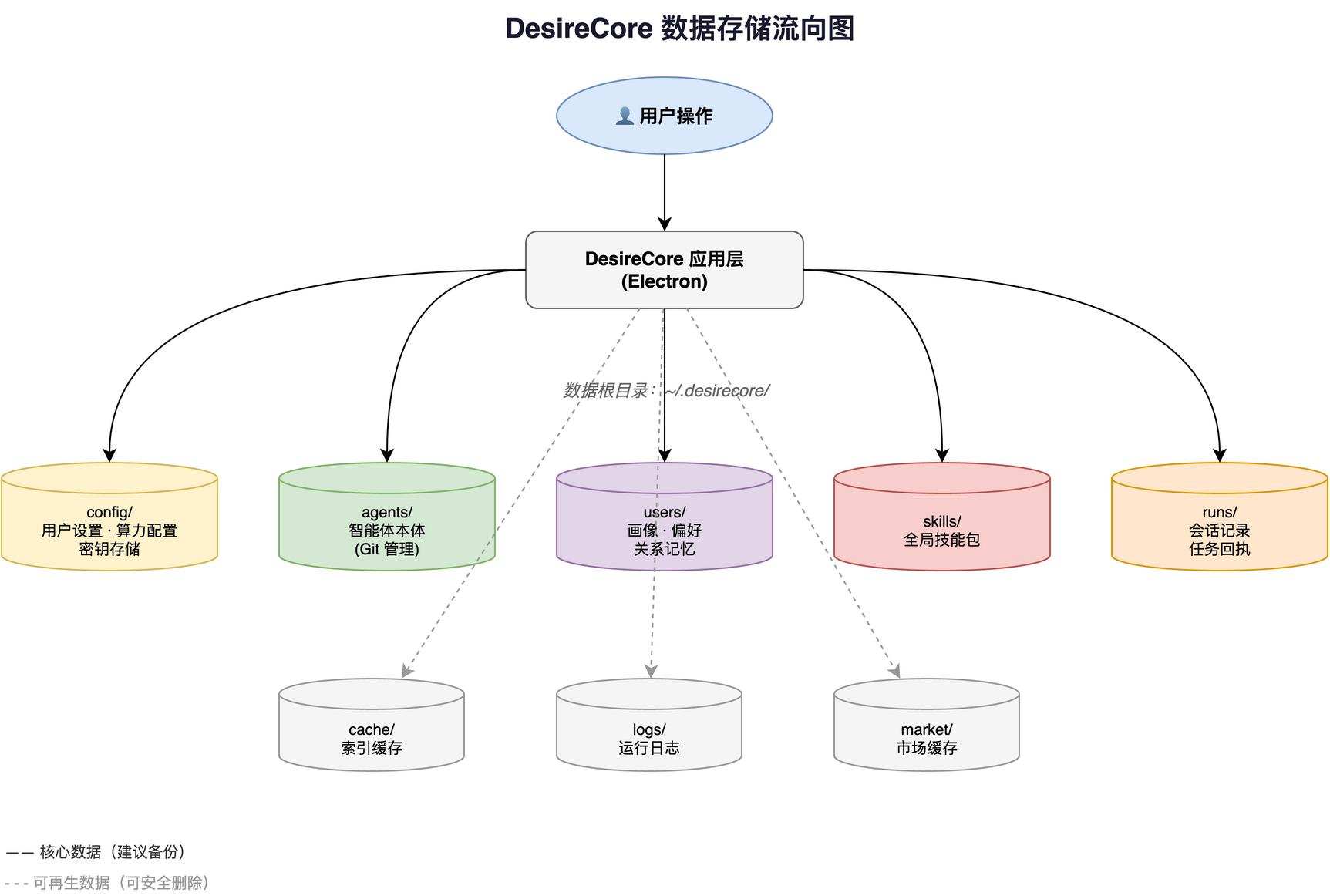
Platform Data Root Directories
| Platform | Data Root Directory |
|---|---|
| macOS | ~/.desirecore/ |
| Windows | User folder\.desirecore\ |
| Linux | ~/.desirecore/ |
~represents the user home directory. For example, on macOS:/Users/your_username/.desirecore/
Directory Structure Details
| Directory | Purpose | Contents | Can Delete? |
|---|---|---|---|
config/ | Global configuration | User settings, compute configuration, and the protected local secrets store | Restores defaults and removes local credentials after deletion |
config/avatar/ | User avatar | JPEG/PNG/WebP format avatar files | Safe to delete |
agents/ | Agent files | Subdirectory for each agent (Git repository) | Loses agent data after deletion |
agents/desirecore/ | Core agent | DesireCore built-in agent | Auto-reinstalls after deletion |
users/ | User data | Personal profile, preferences, relationship memories with agents | Loses personalized data after deletion |
skills/ | Global skills | All installed global skill packs | Built-in skills auto-reinstall after deletion |
runs/ | Run records | Session records, task receipts | Safe to delete (loses history) |
cache/ | Cache | Index cache, relationship graph cache | Safe to delete (auto-rebuilds) |
logs/ | Logs | Runtime logs and troubleshooting information | Safe to delete |
market/ | Market data | Official market repository cache | Safe to delete (re-fetches) |
Application Directory
DesireCore application installation paths:
| Platform | Application Path |
|---|---|
| macOS | /Applications/DesireCore.app |
| Windows | C:\Users\YourUsername\AppData\Local\Programs\desirecore\ |
| Linux | Depends on AppImage file location |
Configuration Files
| File | Path | Description |
|---|---|---|
| User Config | config/user-profile.json | User basic info and preferences |
| Compute Config | config/compute.json | Compute Providers, models, and API key references; no key plaintext |
| Local Secrets Store | config/secrets.json | Sensitive values such as compute API keys and account sessions; always excluded from in-app export |
| Shortcuts Config | config/shortcuts.json | Custom keyboard shortcuts |
Backup Recommendations
The following directories contain important non-reproducible data. Regular backup is recommended:
| Priority | Directory | Reason |
|---|---|---|
| High | agents/ | All learning outcomes and configurations of agents |
| High | users/ | Personal profile and relationship memories |
| Medium | config/ | Personal settings and compute configuration; a raw copy may also contain local secrets |
| Medium | skills/ | User-defined skills |
| Low | runs/ | Historical task records |
Use Settings > Data & Privacy > Export Data for a regular backup. A regular backup is a restore point for the same device and identity. For another device, use Migrate to New Device so identity-scoped data is handled correctly.
Neither an in-app backup nor a migration package directly archives the original config/secrets.json. If you explicitly opt in, the migration wizard can put eligible user-managed compute Provider API keys into a separate payload protected with scrypt and AES-256-GCM. Account sessions, official cloud credentials, and OAuth- or CLI-managed credentials are not migrated this way.
Clearing Data
In "Settings > Data & Privacy > Clear Local Data", you can selectively clear:
| Data Category | Clear Scope | Recoverable? |
|---|---|---|
| Conversation Records | Chat messages, session history, receipts | Not recoverable |
| Agents | Configurations, personas, memories (core agents auto-reinstall) | Not recoverable |
| Skills | Global skills (built-in skills auto-reinstall) | Not recoverable |
| Compute | Provider configurations, model lists | Not recoverable |
| Storage | S3 or object storage connection settings | Not recoverable |
| Code Hosting | GitHub, Gitee, Gitea connection settings | Not recoverable |
| User Profile | Identity, avatar, memory bank | Not recoverable |
| Market Data | Marketplace repository cache | Auto-rebuilds |
| Cache & Logs | Index cache, logs, troubleshooting data | Auto-rebuilds |
Audit logs can be exported as a separate export category. The current clear-data entry does not expose a separate audit-log category; related execution records are handled through their actual storage locations, such as conversations or cache and logs.
Copying the entire data root is different from in-app export: it may copy config/secrets.json, so treat the result as credential-bearing data. If a migration package includes optional encrypted API keys, store it separately from its migration passphrase. Sign-in state and externally managed credentials that cannot be migrated must be authorized again on the new device.